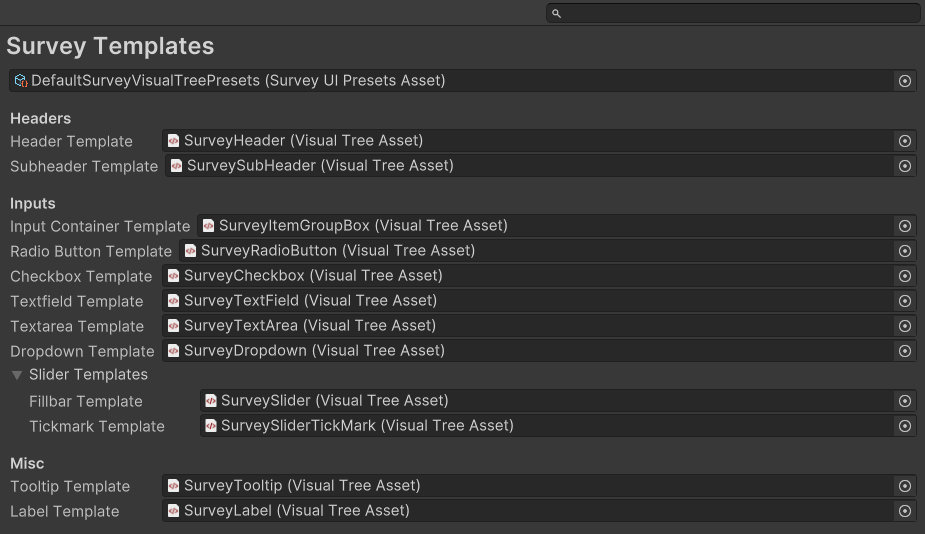
The field at the top of this section takes a ScriptableObject asset. This is the file that stores all the settings for this feature. Either create a new asset (Project Window: Right-click > Create > ScriptableObject > Assessments > Survey > UI Presets Asset) or select an existing one.
When an asset is assigned, Unity displays all the options stored in it directly below. Any changes you make to these options are saved to the assigned asset.
Survey Visual Presets
Headers
Template assets for survey headers.
└Header Template
The layout used for the main header of the survey.
└Subheader Template
The layout used for secondary titles, such as section subtitles or step descriptions.
Inputs
Template assets for survey input elements.
└Input Container Template
The overall layout that holds one or more input elements for a survey question.
└Radio Button Template
The layout for a single radio button option.
└Checkbox Template
The layout for a single checkbox option.
└Textfield Template
The layout for a single-line text input.
└Textarea Template
The layout for a multi-line text input.
└Dropdown Template
The layout for a dropdown list.
└Slider Templates
Foldout grouping the slider layouts.
└Fillbar Template
The layout for the visual fillbar portion of a slider input.
└Tickmark Template
The layout for tick marks on a slider.
Misc
Template assets for miscellaneous UI elements.
└Tooltip Template
The layout for tooltips, which display extra information when the user hovers over or focuses on an element.
└Label Template
The layout for labels that contain text identifying or describing a specific UI element or input field.