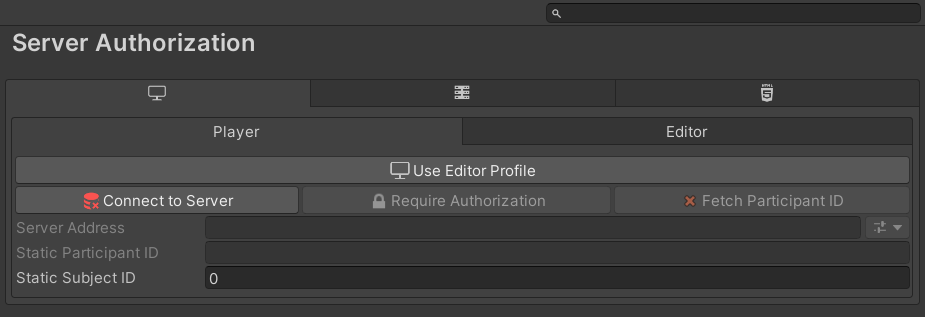
Use Editor Profile
Only affects the Editor. Toggles whether the Editor uses the Editor profile (for debugging) or the Player profile in Play mode. Builds always use the Player profile.
Connect to Server
Determines whether to connect to the server at startup for authorization. If disabled, the session proceeds immediately with the Static Subject ID as if validation had passed.
Require Authorization
Requires Connect to Server to be enabled. If authorization fails, this controls whether the participant is still allowed to proceed using the Static Subject ID. When enabled, the Static Subject ID field is grayed out.
Fetch Participant ID
Requires Connect to Server to be enabled. WebGL builds only (the toggle is disabled on other platform tabs). When enabled, the Participant ID is extracted from the browser page URL and sent to the server. If disabled, the Static Participant ID is used instead.
Server Address
The URI pointing to the server's mTurkServer.php file, which handles validating Participant IDs and issuing Subject IDs. The preset button next to the field fills in the local host address (http://localhost:8000/mTurkServer.php).
Static Participant ID
A manually configured Participant ID that is sent to the server when Fetch Participant ID is disabled.
Static Subject ID
A fallback Subject ID used if Connect to Server is disabled or authorization fails (if allowed).