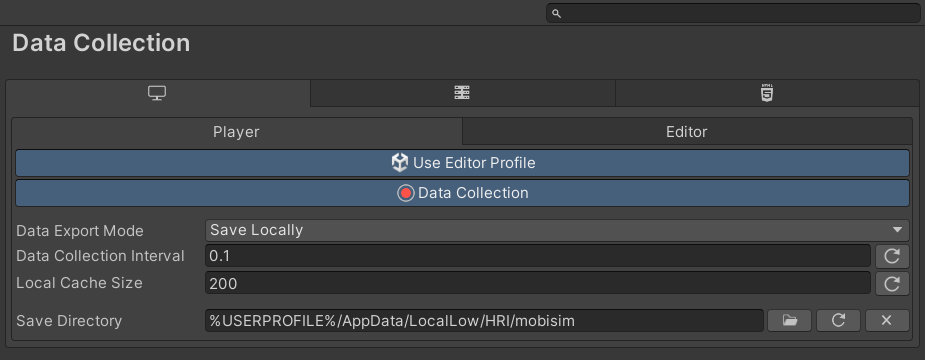
Use Editor Profile
Enables the Editor to use the Editor Data Collection profile instead of the Player profile when entering Play mode. Useful for keeping separate settings or for debugging without affecting Player settings. No effect in builds, which always use the Player profile.
Data Collection
Master switch for the selected profile (Player or Editor) of the selected platform. When disabled, no data is collected, cached, saved, or uploaded, and all other settings below are grayed out. Enabled by default.
Data Export Mode
Selects how data is exported. Options: Upload To Server (sends data to a remote server) or Save Locally (writes data to the local machine). The selected mode determines which additional settings are available.
Data Collection Interval
Time interval (in seconds) for collecting data in scenes with continuous logging enabled.
Local Cache Size
Maximum number of cached entries before an export is forced. Data is cached and exported either on scene change or when this limit is reached.
Save Directory
Absolute file path for saving data locally. Using environment variables like %USERPROFILE% is recommended for compatibility across machines and user accounts. If left empty, Application.persistentDataPath is used. The buttons next to the field open a folder picker, reset the path to the persistent data path, or clear it.
Server Address
URL of the server that data is uploaded to. The preset button next to the field fills in the local host address (http://localhost:8000/senddata.php).
Request Timeout
Time (in seconds) before a data upload request times out.
Max Retry Count
Number of retry attempts for failed uploads before data is considered lost.